Android Components
Android app components are entry points through which the system or another app can create or interact with your application. The process may start for an Activity, Service, BroadcastReceiver, or ContentProvider, so initialization must not assume that the user opened a screen first.
Core components
Android app components
The four core app components are Activity, Service, BroadcastReceiver, and ContentProvider. Each has a distinct role and lifecycle. Activities, services, and providers are declared in AndroidManifest.xml; receivers can be declared in the manifest or registered at runtime.
Whether a component is available to other apps depends on its intent filters, permissions, and android:exported configuration. Keep internal components non-exported and validate all data received by exported components.
Activity
Activity is the main entry point for user interaction. It owns a window where the app presents UI, but it does not have to map one-to-one to a screen.
Modern apps often use a single Activity as a host for Fragment or Compose navigation. The system manages the activity through lifecycle callbacks and may destroy and recreate it after configuration changes or process death. UI state should therefore live at the appropriate state holder and be restored when needed.
See Activity, Fragment & Lifecycle for lifecycle states and restoration boundaries.
Service
Service is a component without its own UI. Use it for work that must be owned independently of a screen or for exposing an API to other components through binding.
Important: a service is not a background thread. Its lifecycle callbacks run on the main thread by default, so blocking or CPU-intensive work must run on an appropriate coroutine dispatcher, worker, or executor.
Started and bound describe how a service is controlled and how long it lives. Foreground describes a user-visible execution mode with a notification. These concepts are not mutually exclusive: one service can be started, bound, and foreground at the same time.
Started service
A started service is launched with startService() or, when foreground execution is allowed and required, startForegroundService(). The system calls onStartCommand(), and the service can continue after the component that started it is destroyed.
It must stop itself with stopSelf() or be stopped with stopService(). Do not use a service as a generic way to keep an app alive. Modern Android restricts background execution; deferrable, guaranteed work is usually better handled by WorkManager.
See Background Work & System Behavior for WorkManager, foreground services, Doze, and background execution limits.
Bound service
A bound service exposes a client-server interface. A component calls bindService() with a ServiceConnection; the service receives onBind() and returns an IBinder through which the client communicates with it.
A purely bound service normally exists while at least one client is bound. Pair bind and unbind calls with the client lifecycle, commonly onStart() / onStop() when the connection is needed only while an Activity is visible.
For a service and client in the same process, a custom Binder can expose the service API directly:
class PlaybackService : Service() {
    inner class LocalBinder : Binder() {
        fun getService(): PlaybackService = this@PlaybackService
    }

    private val binder = LocalBinder()

    override fun onBind(intent: Intent): IBinder = binder

    fun play() {
        // Start playback on an appropriate execution context.
    }
}
Context.BIND_AUTO_CREATE creates the service when the first client binds if it is not already running. For cross-process communication, use Messenger for serialized messages or AIDL when a typed concurrent IPC contract is genuinely required. Both add lifecycle, failure-handling, and thread-safety concerns.
A service can be both started and bound. Unbinding the last client then does not stop it: its started lifetime must also end through stopSelf() or stopService().
Use an explicit Intent when binding. If the service is private to the app, declare android:exported="false".
BroadcastReceiver
BroadcastReceiver lets an app react to broadcasts from the system or other apps. It is a short-lived entry point, not a place for long-running work.
onReceive() runs on the main thread and should return quickly. goAsync() lets short asynchronous work finish after onReceive() returns, but it does not remove the execution time limit. Delegate longer or deferrable work to WorkManager; use a foreground service only when the task is user-visible and the platform permits it.
Receivers can be registered in the manifest or at runtime. Account for implicit broadcast restrictions, permissions, and exported/non-exported registration flags. Treat incoming intents as untrusted when another app can send them.
ContentProvider
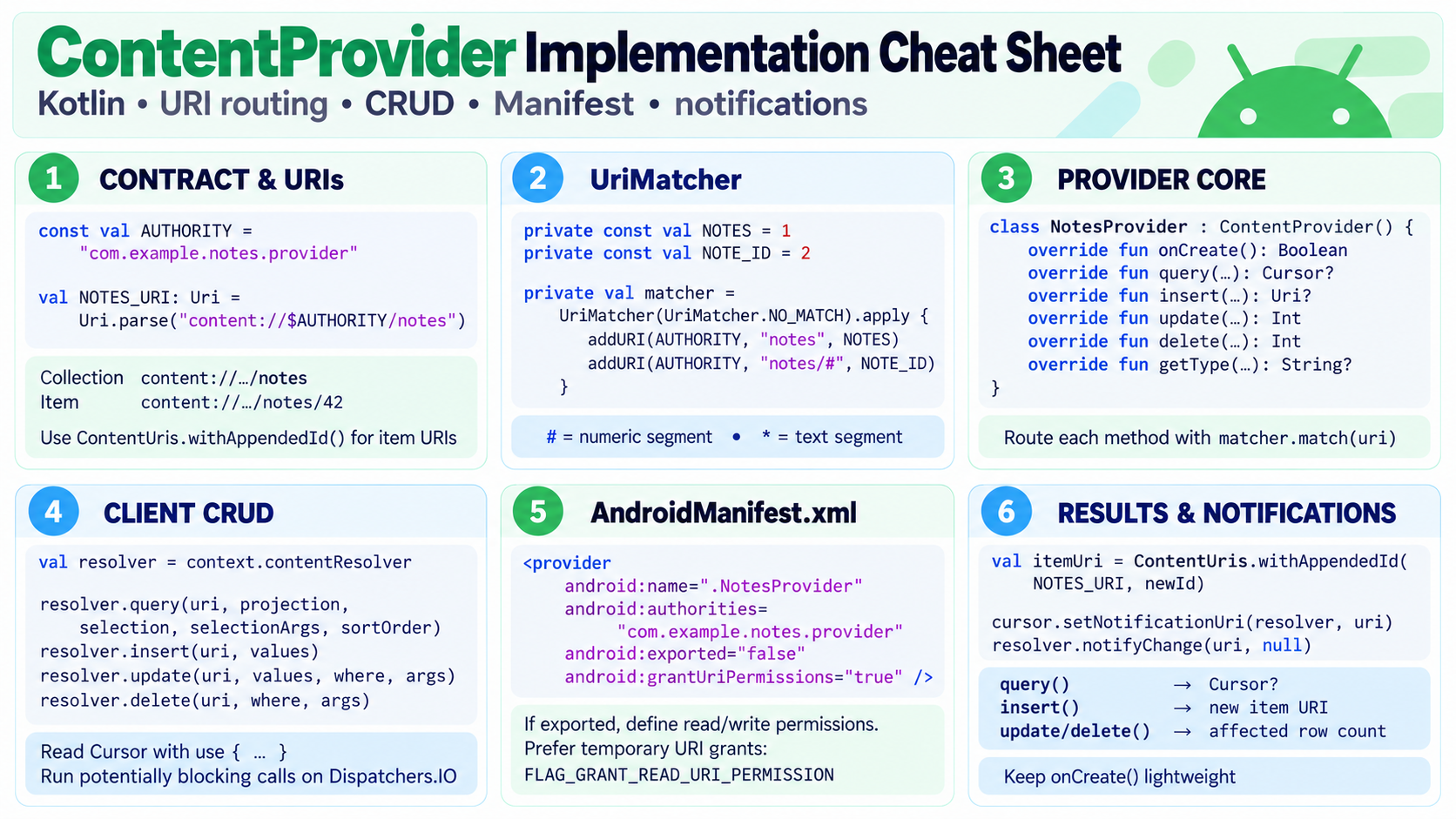
ContentProvider exposes structured data through a URI-based API. Clients access it through ContentResolver, regardless of whether the underlying data comes from a database, files, or another source.
Common examples are ContactsProvider, MediaStore, and FileProvider. Providers can be app entry points and may be initialized before Application.onCreate(), so avoid heavy startup work. If a provider is exported, protect sensitive operations with narrow URI permissions or explicit permissions.
Passing data
Intent: explicit vs implicit
An explicit Intent names the target component and is normally used for internal navigation or service communication.
val intent = Intent(this, DetailsActivity::class.java)
    .putExtra("item_id", itemId)
startActivity(intent)
An implicit Intent describes an action. Android resolves a matching component through intent filters. Use a chooser when the user should select the destination, and check that the intent can be handled when no match is possible.
val intent = Intent(Intent.ACTION_SEND).apply {
    type = "text/plain"
    putExtra(Intent.EXTRA_TEXT, "Hello, world!")
}
startActivity(Intent.createChooser(intent, "Share"))
Bundle
Bundle is a key-value container used for intent extras, Fragment arguments, onSaveInstanceState(), and integration with SavedStateHandle. It supports primitives, String, Parcelable, Serializable, and selected arrays and collections.
Bundles are transferred through Binder and are not designed for large object graphs. Large payloads can cause TransactionTooLargeException. Pass a stable identifier and load the data from a repository, database, or cache instead.
Serializable vs Parcelable
Serializable is a general Java serialization mechanism. It is convenient for simple cases but typically adds more runtime work and allocations.
Parcelable is Android's IPC-oriented format for values placed in an Intent or Bundle. Kotlin's @Parcelize plugin generates the implementation and avoids most boilerplate.
Prefer Parcelable for Android component boundaries when an object must be passed, but keep payloads small. An identifier is usually a more robust contract than transferring an entire domain object.